Cross-validation
The scene: 42 and 7
Your student built a model and got accuracy = 0.81. You say: "change random_state to 7 and try again."
They change it. 0.76.
The student is puzzled: "I didn't change the model. Why is the number different?"
Because what they measured was not the model, it was the split. This chapter fixes that.
Column names
The data is synthetic Tashkent rental listings, and its column names are Uzbek. tuman district, xonalar rooms, maydon_m2 area in m², qavat floor, qavatlar_soni floors in the building, metro_km distance to the metro, mebel furnished (0/1), qurilgan_yil year built. The target ijaraga_berildi_30k means rented within 30 days.
Let me show you the problem
import pandas as pd
import numpy as np
from sklearn.model_selection import train_test_split
from sklearn.pipeline import Pipeline
from sklearn.compose import ColumnTransformer
from sklearn.preprocessing import StandardScaler, OneHotEncoder
from sklearn.impute import SimpleImputer
from sklearn.linear_model import LogisticRegression
from sklearn.metrics import accuracy_score

df = pd.read_csv(DATA / "uy_ijara.csv")
num = ["xonalar", "maydon_m2", "qavat", "qavatlar_soni", "metro_km", "mebel", "qurilgan_yil"]
X, y = df[num + ["tuman"]], df["ijaraga_berildi_30k"]

def build_pipe():
    return Pipeline([
        ("prep", ColumnTransformer([
            ("num", Pipeline([("impute", SimpleImputer(strategy="median")),
                              ("scale", StandardScaler())]), num),
            ("cat", OneHotEncoder(handle_unknown="ignore"), ["tuman"]),
        ])),
        ("model", LogisticRegression(max_iter=2000)),
    ])

results = []
for rs in [0, 1, 7, 13, 42, 99, 123, 2026]:
    X_tr, X_te, y_tr, y_te = train_test_split(X, y, test_size=0.3, random_state=rs, stratify=y)
    a = accuracy_score(y_te, build_pipe().fit(X_tr, y_tr).predict(X_te))
    results.append(a)
    print(f"  random_state={rs:<5} accuracy = {a:.4f}")

print()
print(f"Lowest : {min(results):.4f}")
print(f"Highest: {max(results):.4f}")
print(f"Spread : {max(results) - min(results):.4f}")
  random_state=0     accuracy = 0.6944
  random_state=1     accuracy = 0.7361
  random_state=7     accuracy = 0.7083
  random_state=13    accuracy = 0.7250
  random_state=42    accuracy = 0.7778
  random_state=99    accuracy = 0.7056
  random_state=123   accuracy = 0.7056
  random_state=2026  accuracy = 0.7139

Lowest : 0.6944
Highest: 0.7778
Spread : 0.0833
One model. One dataset. A whole range of results.
If you pick random_state=42 and write "my model gets 0.78" in a report, that isn't a lie, but it isn't complete. Another split gives another number.
The fix: test every row exactly once
The idea of cross-validation is simple. Split the data into k parts. Then train k times: each time one part is the test, the rest is train.
In the end every row is tested exactly once.
diagramma(
    {
        "fold 1:  TEST | train | train | train | train": (0, 0, 7, 0.9, "xizmat"),
        "fold 2:  train | TEST | train | train | train": (0, 1.2, 7, 0.9, "qayta"),
        "fold 3:  train | train | TEST | train | train": (0, 2.4, 7, 0.9, "qayta"),
        "fold 4:  train | train | train | TEST | train": (0, 3.6, 7, 0.9, "qayta"),
        "fold 5:  train | train | train | train | TEST": (0, 4.8, 7, 0.9, "qayta"),
        "5 scores -> mean ± spread": (1.5, 6.2, 4, 0.9, "saqlash"),
    },
    [("fold 1:  TEST | train | train | train | train", "5 scores -> mean ± spread"),
     ("fold 5:  train | train | train | train | TEST", "5 scores -> mean ± spread")],
    nom="cv.png",
    izoh="5-fold cross-validation: the model is trained 5 times, and every row is tested once.",
)
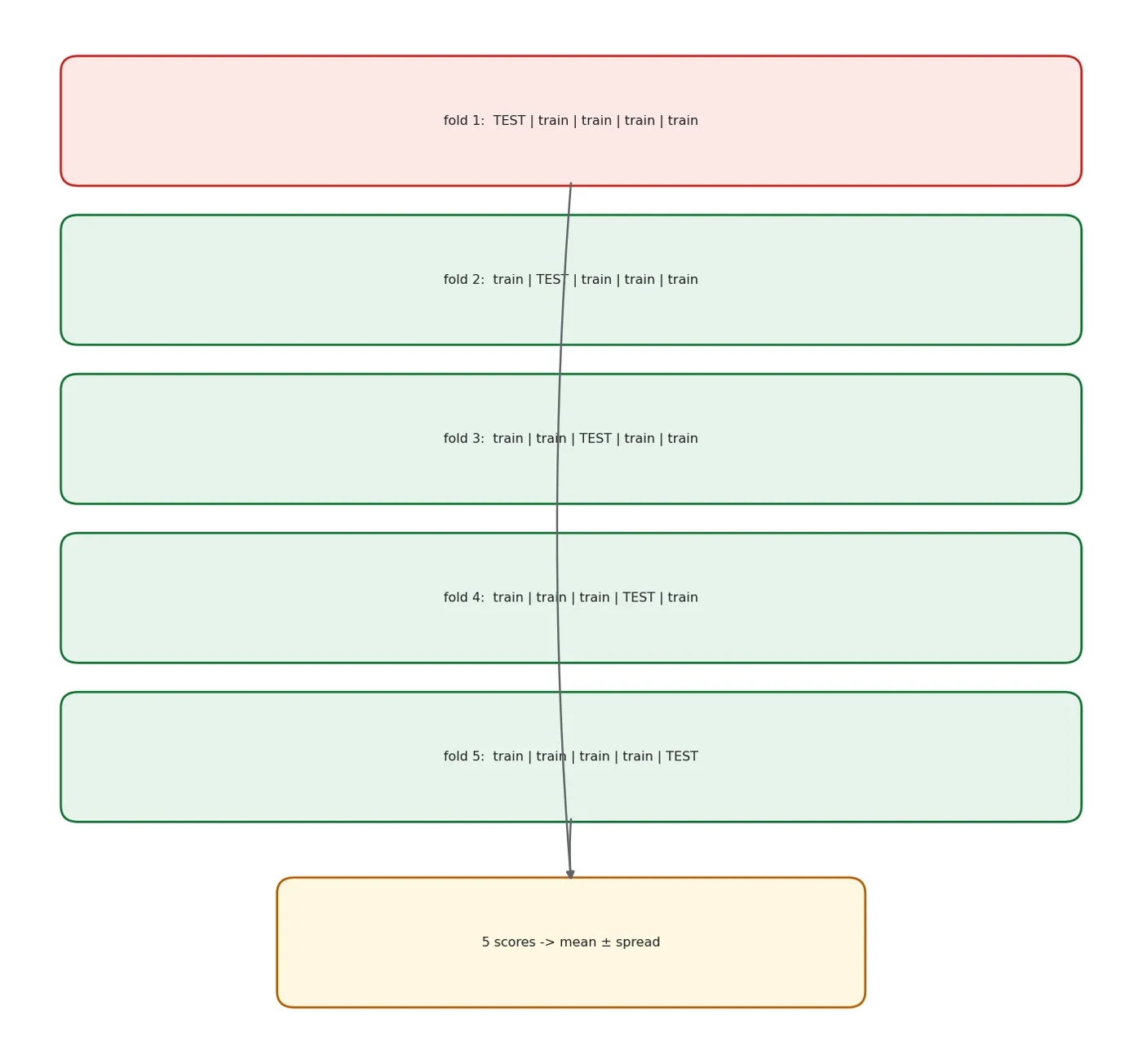
5-fold cross-validation: the model is trained 5 times, and every row is tested once.
from sklearn.model_selection import cross_val_score

scores = cross_val_score(build_pipe(), X, y, cv=5, scoring="accuracy")
print("Each fold:", scores.round(4).tolist())
print()
print(f"Mean   : {scores.mean():.4f}")
print(f"Spread : ±{scores.std():.4f}")
print()
print(f"In a report you write: {scores.mean():.3f} ± {scores.std():.3f}")
Each fold: [0.7292, 0.7042, 0.7, 0.7042, 0.7458]

Mean   : 0.7167
Spread : ±0.0179

In a report you write: 0.717 ± 0.018
That is the right answer: not one number, but a number and its spread.
Always two numbers in a report
accuracy = 0.78 is incomplete.
accuracy = 0.781 ± 0.019 (5-fold CV) is complete.
The second number matters as much as the first. It answers "how much can I trust this number".
StratifiedKFold: the default for classification
For classification, cross_val_score automatically uses StratifiedKFold, so the class ratio is kept in every fold. Let's show it.
from sklearn.model_selection import KFold, StratifiedKFold

print("Share of 'yes' in each fold:")
print(f"{'fold':>5} {'KFold':>9} {'StratifiedKFold':>17}")
print("-" * 34)
kf = list(KFold(n_splits=5, shuffle=True, random_state=42).split(X, y))
sk = list(StratifiedKFold(n_splits=5, shuffle=True, random_state=42).split(X, y))
for i in range(5):
    print(f"{i+1:>5} {y.iloc[kf[i][1]].mean():>8.1%} {y.iloc[sk[i][1]].mean():>16.1%}")
print()
print(f"True ratio: {y.mean():.1%}")
Share of 'yes' in each fold:
 fold     KFold   StratifiedKFold
----------------------------------
    1    49.2%            50.4%
    2    53.3%            50.4%
    3    47.9%            50.8%
    4    53.8%            50.8%
    5    49.2%            50.8%

True ratio: 50.7%
Our data is large and balanced, so the difference is small. But on imbalanced or small data, KFold can leave not a single positive example in some fold, and recall can't be computed for that fold.
Pipeline inside CV: why it's mandatory
This is the most important practical point. CV has to redo the preprocessing in every fold. Otherwise leakage comes back.
from sklearn.preprocessing import StandardScaler as SS

# WRONG: preprocess all the data first, then CV
imp = SimpleImputer(strategy="median").fit(X[num])
scaler = SS().fit(imp.transform(X[num]))
X_before = pd.DataFrame(scaler.transform(imp.transform(X[num])), columns=num, index=X.index)
bad = cross_val_score(LogisticRegression(max_iter=2000), X_before, y, cv=5)

# RIGHT: preprocessing inside the Pipeline, redone in every fold
good = cross_val_score(build_pipe(), X, y, cv=5)

print(f"WRONG (preprocess first, then CV): {bad.mean():.4f} ±{bad.std():.4f}")
print(f"RIGHT (Pipeline inside CV)       : {good.mean():.4f} ±{good.std():.4f}")
print(f"Difference                       : {bad.mean() - good.mean():+.4f}")
WRONG (preprocess first, then CV): 0.7108 ±0.0155
RIGHT (Pipeline inside CV)       : 0.7167 ±0.0179
Difference                       : -0.0058
The difference is small again, because StandardScaler "sees" very little. But with SelectKBest or target encoding, the difference is large and you'll be fooled.
Give CV a Pipeline, not a model object
cross_val_score(model, X_cleaned, y) is leakage.
cross_val_score(pipeline, X_raw, y) is correct.
To remember the difference: CV gets raw data. The cleaning happens inside it.
One number is not enough: cross_validate
cross_val_score gives you one metric. In practice you need several.
from sklearn.model_selection import cross_validate

result = cross_validate(build_pipe(), X, y, cv=5,
                        scoring=["accuracy", "precision", "recall", "f1", "roc_auc"],
                        return_train_score=True)
rows = []
for m in ["accuracy", "precision", "recall", "f1", "roc_auc"]:
    te = result[f"test_{m}"]
    tr = result[f"train_{m}"]
    rows.append({"Metric": m,
                 "Test mean": round(te.mean(), 4), "Test ±": round(te.std(), 4),
                 "Train mean": round(tr.mean(), 4),
                 "Train - Test": round(tr.mean() - te.mean(), 4)})
show(pd.DataFrame(rows))
| Metric | Test mean | Test ± | Train mean | Train - Test |
|---|---|---|---|---|
| accuracy | 0.717 | 0.018 | 0.717 | -0 |
| precision | 0.712 | 0.028 | 0.709 | -0.003 |
| recall | 0.745 | 0.017 | 0.747 | 0.002 |
| f1 | 0.727 | 0.012 | 0.728 | 0 |
| roc_auc | 0.783 | 0.022 | 0.793 | 0.01 |
The last column is the measure of overfitting. If the gap between train and test is large, the model memorised.
Ours is small, so the model didn't memorise; it really generalised. (Bias-variance comes in Chapter 12.)
Comparing two models: where people go wrong most
Now the most important practical question: how do we compare two models?
from sklearn.ensemble import RandomForestClassifier

def with_pipe(model):
    return Pipeline([
        ("prep", ColumnTransformer([
            ("num", Pipeline([("impute", SimpleImputer(strategy="median")),
                              ("scale", StandardScaler())]), num),
            ("cat", OneHotEncoder(handle_unknown="ignore"), ["tuman"]),
        ])),
        ("model", model),
    ])

lr = cross_val_score(with_pipe(LogisticRegression(max_iter=2000)), X, y, cv=5)
rf = cross_val_score(with_pipe(RandomForestClassifier(n_estimators=200, random_state=42)), X, y, cv=5)

print("Logistic Regression:", lr.round(4).tolist())
print(f"  mean {lr.mean():.4f} ±{lr.std():.4f}")
print()
print("Random Forest      :", rf.round(4).tolist())
print(f"  mean {rf.mean():.4f} ±{rf.std():.4f}")
print()
print(f"Gap between means  : {abs(rf.mean() - lr.mean()):.4f}")
print(f"Largest spread     : ±{max(lr.std(), rf.std()):.4f}")
print()
leader = "Random Forest" if rf.mean() > lr.mean() else "Logistic Regression"
confidence = "gap is LARGER than the spread" if abs(rf.mean()-lr.mean()) > max(lr.std(), rf.std()) else "gap is WITHIN the spread"
print(f"Leader: {leader}  |  {confidence}")
Logistic Regression: [0.7292, 0.7042, 0.7, 0.7042, 0.7458]
  mean 0.7167 ±0.0179

Random Forest      : [0.7042, 0.6917, 0.6792, 0.6875, 0.725]
  mean 0.6975 ±0.0159

Gap between means  : 0.0192
Largest spread     : ±0.0179

Leader: Logistic Regression  |  gap is LARGER than the spread
The rule for reaching a verdict:
show(pd.DataFrame([
    {"Case": "Gap > 2 x spread", "Conclusion": "The gap is reliable: take the better one"},
    {"Case": "Gap ~ spread", "Conclusion": "Doubtful: compare the fold ranges"},
    {"Case": "Gap < spread", "Conclusion": "There is NO difference: take the simpler/faster model"},
]))
| Case | Conclusion |
|---|---|
| Gap > 2 x spread | The gap is reliable: take the better one |
| Gap ~ spread | Doubtful: compare the fold ranges |
| Gap < spread | There is NO difference: take the simpler/faster model |
The last row matters most. If the gap is smaller than the spread, you pick the simpler model: it's faster, understandable and breaks less.
Look at the fold ranges too, not just the means
In Chapter 42 I made this mistake on titanic. The gap between the means was 0.0303 and the spread ±0.0248, so the gap looked bigger. But when I put the folds side by side, the ranges overlapped: the worse model's best fold was higher than the better model's worst fold.
So: if min(a) > max(b), it's reliable. Otherwise be careful.
How many folds?
print(f"{'cv':>4} {'mean':>10} {'spread':>11} {'time (rel.)':>14}")
print("-" * 42)
import time
for k in [3, 5, 10]:
    t0 = time.perf_counter()
    b = cross_val_score(build_pipe(), X, y, cv=k)
    dt = time.perf_counter() - t0
    print(f"{k:>4} {b.mean():>10.4f} {b.std():>10.4f} {dt:>13.2f}s")
  cv       mean      spread    time (rel.)
------------------------------------------
   3     0.7175     0.0054          0.02s
   5     0.7167     0.0179          0.04s
  10     0.7175     0.0478          0.07s
The practical choice:
- cv=5: the default. Enough in most cases.
- cv=10: small data (< 1000 rows), or when you need a more precise estimate.
- cv=3: when the data is very large or the model is slow.
Data with time: TimeSeriesSplit
Ordinary CV shuffles the folds, so the model learns from the future to predict the past. With time-ordered data, that is forbidden.
from sklearn.model_selection import TimeSeriesSplit

tss = TimeSeriesSplit(n_splits=4)
fake = np.arange(20)
print("TimeSeriesSplit: train always comes BEFORE test:")
for i, (tr_i, te_i) in enumerate(tss.split(fake), 1):
    print(f"  fold {i}: train={tr_i.min()}..{tr_i.max()}   test={te_i.min()}..{te_i.max()}")
TimeSeriesSplit: train always comes BEFORE test:
  fold 1: train=0..3   test=4..7
  fold 2: train=0..7   test=8..11
  fold 3: train=0..11   test=12..15
  fold 4: train=0..15   test=16..19
Notice that the train set keeps growing and the test always comes after it. That's how real life works: you train on today's data and predict tomorrow.
What we learned today
show(pd.DataFrame([
    {"Concept": "One split isn't enough", "In one sentence": "Change random_state and the number changes"},
    {"Concept": "cross_val_score", "In one sentence": "Trains k times; every row is tested once"},
    {"Concept": "Mean ± spread", "In one sentence": "Two numbers in a report, not one"},
    {"Concept": "StratifiedKFold", "In one sentence": "Automatic for classification; keeps the class ratio"},
    {"Concept": "Pipeline inside CV", "In one sentence": "CV gets RAW data, not cleaned data"},
    {"Concept": "cross_validate", "In one sentence": "Several metrics + the train/test gap (overfitting)"},
    {"Concept": "The comparison rule", "In one sentence": "If the gap is smaller than the spread, there is no gap"},
    {"Concept": "TimeSeriesSplit", "In one sentence": "Don't shuffle when there is time"},
]))
| Concept | In one sentence |
|---|---|
| One split isn't enough | Change random_state and the number changes |
| cross_val_score | Trains k times; every row is tested once |
| Mean ± spread | Two numbers in a report, not one |
| StratifiedKFold | Automatic for classification; keeps the class ratio |
| Pipeline inside CV | CV gets RAW data, not cleaned data |
| cross_validate | Several metrics + the train/test gap (overfitting) |
| The comparison rule | If the gap is smaller than the spread, there is no gap |
| TimeSeriesSplit | Don't shuffle when there is time |
Next chapter, the most important question: there's a number, now what do I do?
Questions about this chapter?
The course, homework review and the other five books are in Uzbek. Questions in English are welcome on Telegram.